Businesses lose countless hours to repetitive, manual work. Moving data between spreadsheets, routing emails, tracking down missing documents, and chasing approvals slows down operations and frustrates employees. You know there is a more efficient way to operate, and you have likely heard that artificial intelligence is the solution. But what exactly does that mean for your daily operations? The concept often sounds more complicated than it really is.
At its core, AI business automation is the use of intelligent software to handle routine tasks, make basic operational decisions based on data, and connect different systems without requiring constant human intervention.
This article explains what AI business automation actually is, how it works, and how it differs from traditional software rules. We will look at practical examples, the real risks involved, and how to decide which of your workflows are ready for an operational upgrade.
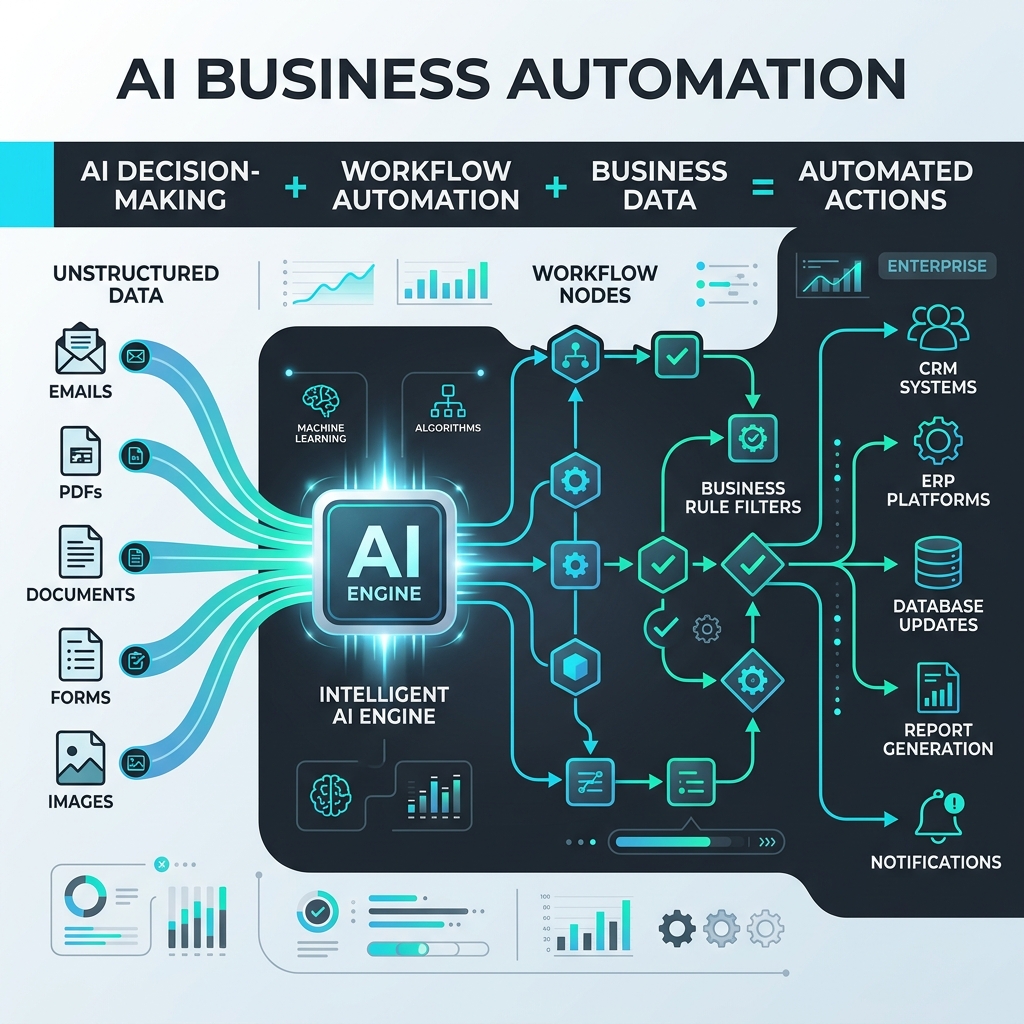
What Is AI Business Automation?
AI business automation combines the reasoning capabilities of artificial intelligence with the structured steps of workflow software to execute business processes. It allows computers to read, classify, and route unstructured information (like emails, PDFs, and customer inquiries) and then take the correct action based on your specific business rules.
If you want a simple way to think about it, use this formula:
AI business automation = AI decision-making + workflow automation + business data + actions
Unlike older software that completely freezes when it encounters a typo or an unfamiliar document layout, AI can interpret context. This means it can take over tasks that previously required a human to look at a screen, interpret the information, and click a button.
How Does AI Business Automation Work?
AI automation operates by linking a trigger (an event) to a series of connected actions. When implemented correctly, the process typically follows these steps:
A business event occurs: A customer sends an email, a vendor submits an invoice, or a web form is filled out.Data enters the workflow: The automation software receives this raw information.AI interprets the information: Instead of just looking for exact keyword matches, the AI reads the context. It might extract the total amount from a messy invoice or determine that a customer email is a request for a refund.Business rules determine the next step: The software checks your operational rules (e.g., "If an invoice is under $500, approve it automatically. If it is over $500, send it to the manager.").The appropriate action is triggered: Information is pushed into your CRM, ERP, or custom dashboard.The result is recorded: The system logs the action and alerts a human only if an exception requires their judgment.AI Automation vs Traditional Business Automation
Automation has existed for decades. The difference today is the introduction of artificial intelligence, which allows software to handle unstructured, messy data rather than just highly structured databases.
Traditional rule-based automation (often called Robotic Process Automation, or RPA) requires rigid instructions. AI-powered automation adapts to context. These two technologies do not replace one another; they work together.
| Feature | Traditional Rule-Based Automation | AI-Powered Business Automation |
|---|
| Inputs required | Structured data (spreadsheets, databases, precise forms) | Unstructured data (emails, PDFs, conversational text, images) |
| Decision-making | Rigid "If X, then Y" rules | Context-aware interpretation and classification |
| Flexibility | Breaks if a process or document layout changes slightly | Adapts to variations in language and document formatting |
| Human involvement | Required to organize data before the software can process it | Required only to review exceptions or make high-level approvals |
| Typical use cases | Syncing two databases, basic data entry | Invoice processing, customer email routing, document extraction |
What Can AI Automate in a Business?
When companies build a single source of truth for their operations, AI can take over a significant portion of the administrative burden. Common practical use cases include:
Email and Document Processing: Reading incoming messages and attachments to extract key dates, names, amounts, and requests.Customer and Lead Management: Scoring inbound sales leads based on their company size and request, then assigning them to the right sales representative.Data Extraction: Pulling specific operational data from legacy systems and formatting it for modern software.Scheduling and Routing: Looking at team availability and automatically assigning service tickets or project tasks to the right employee.Employee or Candidate Onboarding: Verifying that a new hire has submitted all required compliance forms and alerting HR if a document is missing.Operational Dashboards: Pulling daily performance metrics from multiple disconnected tools into one clear interface for leadership.Real-World Examples of AI Business Automation
To understand how this looks in practice, here are realistic examples of how growing companies use AI to improve business operations across different industries.
1. Recruiting and Staffing: Candidate Resume Processing
The manual problem: Recruiters spend hours opening PDF resumes, manually copying work history, and pasting it into an applicant tracking system (ATS).What AI does: The AI reads the incoming PDF, understanding context well enough to extract the applicant's name, phone number, years of experience, and key skills.What the workflow does: The workflow automatically creates a new profile in the ATS, populates the extracted data, and tags the candidate based on the job they applied for.What the human controls: The recruiter reviews the neatly organized profiles and decides who to interview.Expected operational benefit: Drastically reduced data entry time, allowing recruiters to focus on talking to candidates.2. Legal Services: Client Intake and Triage
The manual problem: Paralegals manually read through web inquiries to determine what type of legal help a prospective client needs.What AI does: The AI analyzes the text of the web inquiry and classifies it by case type (e.g., family law, personal injury, real estate).What the workflow does: It routes the classified inquiry to the correct attorney's inbox and generates a draft response requesting the specific documents needed for that case type.What the human controls: The attorney reviews the drafted email, makes necessary edits, and clicks send.Expected operational benefit: Faster response times to potential clients and better lead organization.3. Real Estate: Property Inquiry Routing
The manual problem: A property management firm receives hundreds of emails regarding maintenance requests and leasing questions, all mixed into one inbox.What AI does: AI reads the emails, distinguishing between an urgent plumbing issue and a routine question about lease renewals.What the workflow does: It creates a priority maintenance ticket for the plumbing issue and sends the lease question to the leasing office's business process automation pipeline.What the human controls: The property manager dispatches the plumber and directly handles the lease renewal negotiation.Expected operational benefit: Urgent requests are handled immediately without getting buried under routine paperwork.4. Manufacturing: Supplier Invoice Reconciliation
The manual problem: Accounting staff manually compare paper or PDF invoices from suppliers against purchase orders in a legacy software system.What AI does: The AI extracts line items, quantities, and totals from the supplier invoice, regardless of how the supplier formatted the page.What the workflow does: It compares the extracted data against the purchase order. If they match, it stages the payment for approval. If they do not match, it flags the discrepancy.What the human controls: The accounting manager reviews only the flagged discrepancies and hits "approve" on the matching payments.Expected operational benefit: Fewer manual handoffs, reduced payment errors, and significantly less time spent staring at spreadsheets.What Are the Benefits of AI Business Automation?
When implemented correctly, intelligent automation creates a more resilient, scalable company. While results vary based on the specific process, businesses typically experience:
Less repetitive manual work: Employees spend less time acting as human copy-and-paste machines.Faster processing: Workflows that used to take days to move across different desks can be completed in minutes.Fewer manual handoffs: Connecting tools, workflows, and data directly reduces the chance of information getting lost in transit.Better data consistency: Software applies rules consistently every time, reducing human error in data entry.Improved visibility: Leadership gains real-time insight into operations because information flows automatically into customized operational systems.AI technologies have the potential to automate workflows that currently consume up to 60 to 70 percent of employees' time, provided the underlying systems are properly integrated.
What Are the Limitations and Risks of AI Automation?
AI automation is not simply a matter of buying a software license and plugging it into your business. The quality of your underlying processes, data, and integrations matters deeply. Risks include:
Poor-quality data: If your current data is disorganized, inaccurate, or scattered across disconnected legacy systems, AI will simply process bad information faster.Incorrect AI outputs (Hallucinations): AI models can make mistakes when interpreting data. If there is no human oversight, these errors can cause operational problems.Over-automating: Processes that require deep empathy, complex negotiations, or nuanced human judgment should not be fully automated.Security and privacy concerns: Passing sensitive customer or financial data to third-party AI models without proper data governance can create security liabilities. Organizations should adhere to guidelines when setting up data pipelines.Maintenance difficulty: Badly designed workflows become difficult to update when your business processes change.Which Business Processes Should You Automate First?
A common mistake businesses make is trying to automate their most complex, broken process first. Instead, strong candidates for early automation usually share these characteristics:
High volume: The task happens dozens or hundreds of times a week.Repetitive work: The steps to complete the task are generally the same every time.Clear inputs and outputs: It is obvious where the data comes from and where it needs to go.Multiple manual handoffs: Information frequently moves back and forth between multiple systems or multiple people.Measurable time: You can easily calculate how many hours the task currently costs your team.If a workflow relies heavily on "gut feelings," constantly changing rules, or physical interactions, it is likely not a good candidate for AI automation.
How to Start With AI Business Automation
Implementing AI should be an incremental process rather than a disruptive, year-long rebuild of your entire company. A practical implementation framework includes:
Audit current workflows: Map out exactly how information currently moves through your business.Identify operational friction: Look for bottlenecks where approvals get stuck or where employees do the most manual data entry.Rank opportunities: Grade potential automation projects by their potential operational impact versus the technical risk of building them.Start small: Pick one focused, high-volume workflow.Build and integrate: Create the necessary APIs and automation rules to connect your tools.Test with human oversight: Run the automation alongside your manual process to ensure it works correctly.Expand incrementally: Once the first automated workflow is successful, move on to the next.Does Your Business Need AI Automation?
Not every company needs AI. However, if your operations are struggling to keep up with your growth, it may be time to evaluate your systems. You likely need AI automation if you can answer "yes" to these questions:
Are your employees repeatedly moving information between systems by hand?Are you using massive spreadsheets as a workaround for missing software?Do standard approvals frequently get stuck because an email was missed?Are teams manually compiling data every week to create routine reports?Does leadership lack a real-time, single source of truth for company performance?Are multiple software tools completely disconnected from one another?These are strong signals that manual administrative work is limiting your operational capacity.
How Delta Technologies Approaches AI Business Automation
At Delta Technologies, we know that technology is only useful if it actually solves a business problem. As a custom software development company based in Chicago, Illinois, we help growing companies across healthcare, manufacturing, recruiting, and more improve their business operations.
We do not believe in throwing AI at a problem and hoping it works. Instead, our process starts with a Systems Review. We take the time to audit your current workflows, map your operational friction, and determine exactly where automation will have the highest impact.
Whether you need AI automation services, custom dashboards to create a single source of truth, or custom software development to modernize your legacy systems, our approach is designed to be incremental. We build, test, and implement solutions that reduce manual operational work without disrupting your day-to-day business.
